



Visitor
•
10 Messages
Lag and dropped packets
Hi,
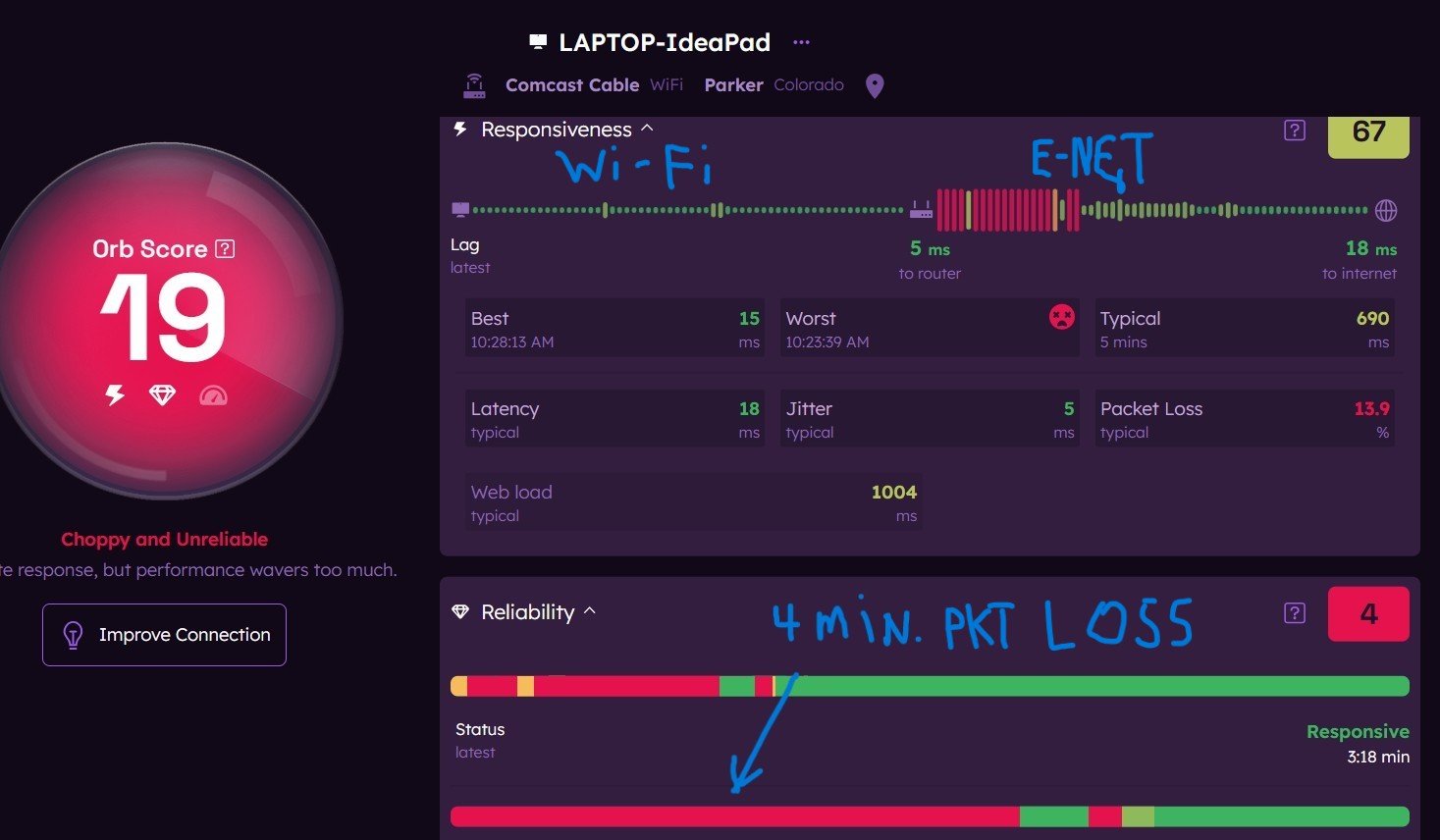
Several times each day there is a short period of time, usually about 5 minutes or so, when I experience lag times of 2-5 seconds and dropped packets getting to the Internet. I have monitored the connection using ORB and I have screenshots of this activity. I am using a Motorola SB6120 DOCSIS 3.0 cable modem hardwired to an ASUS AC-1750 router. Whenever this occurs the delay is always between the Router and the Internet. Any advice about how to figure this out would be appreciated. Here is an example:

XfinityAmandaB
Official Employee
•
3K Messages
8 months ago
6
0
user_ab2oer
Visitor
•
10 Messages
8 months ago
I have resolved this issue as far as I can tell. I changed the ethernet cable from the modem to the router. I had used the same cable forever but it appeared one of the connectors wasn't fully snapping into the port socket so just to make sure I changed the cable. I also viewed the incoming cable signal and it was showing levels between 17-18 dBmv which is above the cable modem spec and above what Xfinity recommends (-7 to +7 dBmv). I added an 8 dB attenuator to reduce the input signal to about 9 to 10 dBmv so it is now within spec for the cable modem. Between these two items the random 2-5 second losses of connection have been eliminated. My current service is 150/40 so just to make sure I am getting all the speed the service offers I ordered a new DOCSIS 3.1 32x8 modem which is overkill but I will see if I now get a little better speed and perhaps less lag delays over time. Thanks for your help!
(edited)
1
0
user_ab2oer
Visitor
•
10 Messages
6 months ago
Hi,
I am back again with the same issue. I continue to get packet drops/no internet for several minutes several times a day and particularly during the early evening when trying to watch streaming services. Very frustrating. I upgraded my cable modem to a Hitron CODA 56 DOCSIS 3.1 model. I am getting about 179 mbs down and 40 mbs up on a "150 mbs" Xfinity service. I will add some ORB screen shots that show the issue I am having. If anyone has any idea how to address this I would reallyl appreciate the help!
Thanks
3
0
EG
Expert
•
117K Messages
6 months ago
@user_ab2oer @XfinityRay
Please circle back here and post any possible solutions for the issue here in these open public forums so that all readers here may benefit from the exchange / info. This is in keeping with the spirit for which these public help forums were originally intended. Thank you.
0
0
user_ab2oer
Visitor
•
10 Messages
6 months ago
Based on their network testing they have to send a technician out to look at their network and the feed to my home. I am trying to change the origianl appointment day/time but their system is down (or very slow) so I will have to try another time.
0
0
user_ab2oer
Visitor
•
10 Messages
6 months ago
Xfinity technician visit resulted in identification of an error due to a device in the outdoor Xfinity junction box located in the back yard. They scheduled another visit (TBD) for the repair. Tech increased the attenuator on coax line input to cable modem from 8db to 12 db to bring modem input to between 5 and 9 dBmv. Also replaced inline coax connector on side of house that joins Xfinity coax from yard box to home coax on side of house. All of these changes are precautionary and might improve quality of signal once the Xfinity junction box is repaired. Currently still have the same issue of laggy response for 2-5 minute intervals often around 5-7pm and sometimes in the early afternoons. Will update after final repairs are made. Sure hope this will work!
0
0
user_ab2oer
Visitor
•
10 Messages
4 months ago
Hi, Just to provide a closing update. After several months working with Xfinity tech support the field team finally identified a component causing noise on the network. I think it affected our whole general area. For months I was losing between 1%-5% packets and for durations between 1-5 minutes. It was often 100% packet loss which basically shut down internet access. At this point in time I have gone at least a week or more with no packet loss and availability of 99.9%. If there is short term congestion or some other issue causing short term increased lag times it does not result in loss of internet access to browsers or streaming devices (e.g. FireTV sticks, phones, etc.) as their buffers are able to hide the disruptions. Xfinity also informed me that a general upgrade is planned for my area in Q2 2026.
I consider this issue closed at this time.
0
0