Hello,
I am experiencing severe, ongoing connection drops, latency spikes, and packet loss that are disrupting real-time applications like video calls, and live data streaming (baby monitors, security cameras) on my PC and wireless devices. This has been occurring consistently for several weeks. The easiest way for me to log this data was via a MMORPG.
I have fully isolated my local network, verified all physical wiring, and am testing via a direct wired Cat6 Ethernet connection to a rented Xfinity XB6 Gateway. My Hop 1 (the gateway itself) shows a perfect 0% packet loss, completely ruling out my local property, router hardware, and premise wiring.
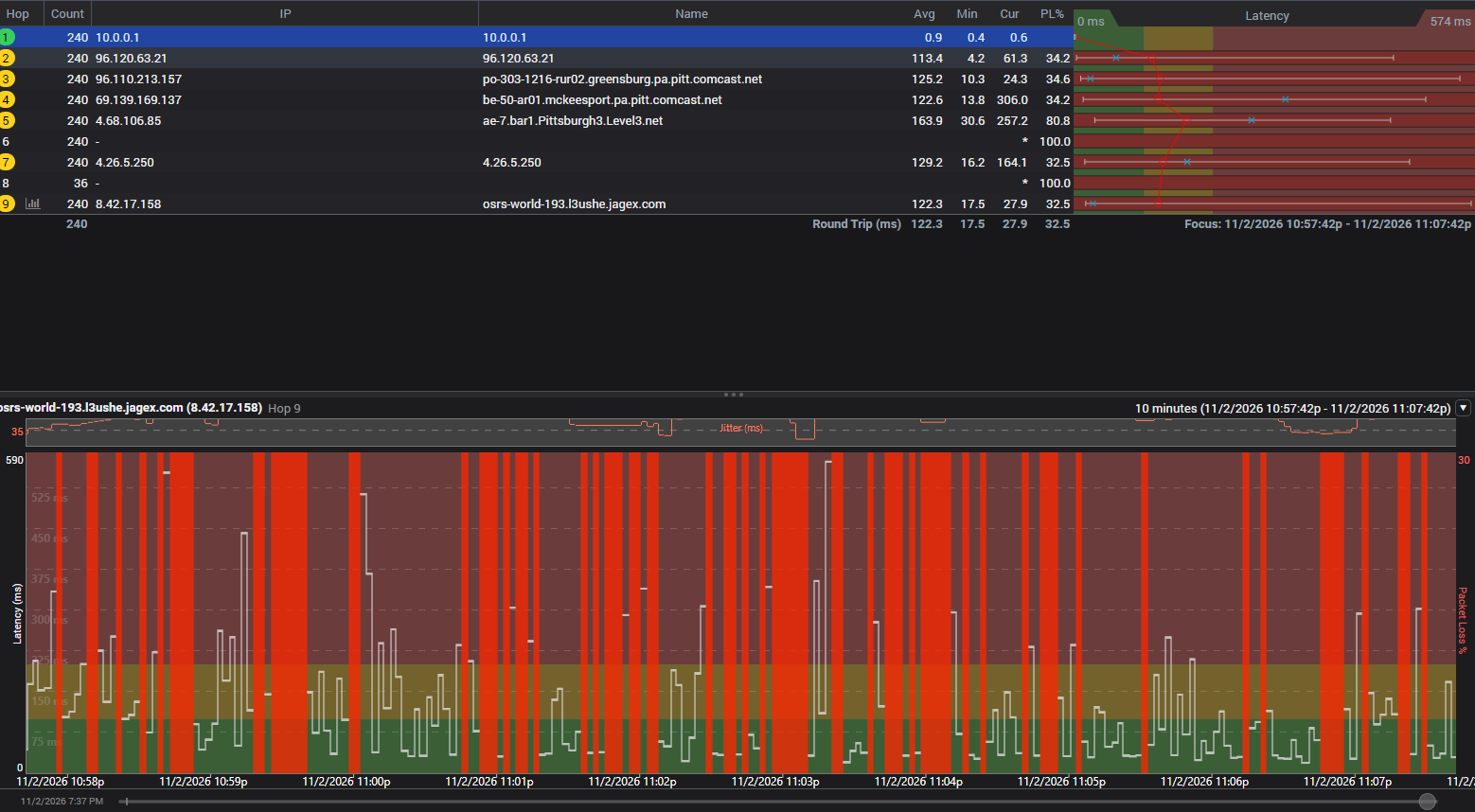
However, my network diagnostics reveal a massive influx of packet loss and a severe latency spike originating exactly at Hop 2, Hop 3, and Hop 4 (the local Comcast CMTS/routing gateway nodes). This packet loss carries consistently all the way through to the final target destination, which completely rules out a benign ICMP router rate-limiting artifact. This is a genuine infrastructure degradation.
Because I am utilizing a rented XB6 gateway, your advanced support tools should easily be able to pull my modem's historical RF health logs, verify the upstream SNR issues, and check the neighborhood node capacity report for local congestion or a failing street amplifier.
Frontline phone agents only offer standard equipment power-cycling scripts, which cannot resolve a physical infrastructure issue out on the street. I am posting here to request that a Digital Care Corporate Team Member review my account diagnostics and escalate this to local network engineers for a formal Line and Node Audit to locate and fix the upstream noise ingress or node overload.
Below is a copy of my recent network diagnostic trace data confirming the node failure:
Target Name: osrs-world-193.l3ushe.jagex.com
IP: 8.42.17.158
Date/Time: 11/2/2026 10:57:42 PM - 11/2/2026 11:07:42 PM
Hop Sent PL% Min Max Avg Host Name / [IP]
1 240 0 0.40 2.51 0.88 10.0.0.1 [10.0.0.1]
2 240 34 4.22 462.12 113.43 96.120.63.21 [96.120.63.21]
3 240 35 10.27 558.11 125.16 po-303-1216-rur02.greensburg.pa.pitt.comcast.net [96.110.213.157]
4 240 34 13.83 508.73 122.63 be-50-ar01.mckeesport.pa.pitt.comcast.net [69.139.169.137]
5 240 81 30.61 457.85 163.86 ae-7.bar1.Pittsburgh3.Level3.net [4.68.106.85]
6 240 100 * * * [-]
7 240 32 16.22 485.39 129.23 4.26.5.250 [4.26.5.250]
8 36 100 * * * [-]
9 240 32 17.49 574.43 122.27 osrs-world-193.l3ushe.jagex.com [8.42.17.158]
Thank you for your assistance in getting this routed to the engineering team.



Accepted Solution
XfinitySean
Official Employee
•
1.2K Messages
2 days ago
Hi there, we appreciate you taking the time to post on the community forums, user_iu4vmi! I'm sorry to hear that you've been unable to resolve your connection issues when reaching out to our support line. Our team would be more than happy to take a closer look into the issue! Please send us a direct message with your full name, name on the account (if different), and service address, and we'll dig in!
How to Send Us a Direct Message:
How to: Direct messaging within the forum
0
EG
Expert
•
123.1K Messages
4 days ago
What do the modem's signal status values look like ? Try getting them here; http://10.0.0.1
Please copy all of the text in its entirety of the *Downstream Power Levels*, the *SNR's* (Signal to Noise Ratios), and the *Upstream Power Level* numbers and paste them into your next post.
0
0
EG
Expert
•
123.1K Messages
2 days ago
@XfinitySean
Why does this have to go private at this point ? That kind of defeats the purpose of a public help forum such as this is, no ?... They haven't even returned with the info I requested yet........
0
0
EG
Expert
•
123.1K Messages
2 days ago
@user_iu4vmi
Modem stats ?
0
0