

Visitor
•
1 Message
[XB8 Gateway] 1 Gbps internet: Problems with ethernet connection. Random online gaming disconnections, random slow speeds. WIFI is fine.
Hello everyone! This problem has completely stumped me. I have upgraded my home internet plan from 500 mbps to 1 gbps, and along with that came a new XB8 gateway replacing my previous XB6. I have never hardwired my PC to the previous gateway as WiFi sufficed with speeds reaching close to my previous plan's max speed. Now that I have gigabit speed, I wanted to take advantage of all of that speed and ran a 20 ft Monoprice Cat6A patch ethernet cable from the 2.5 gigabit ethernet port on my PC to port number 4 on the XB8 gateway.
As a benchmark for speeds on WiFi with gigabit internet, I was doing about 650 mbps with the WiFi 6e capable ASUS ROG Strix x570-E Gaming WiFi II motherboard. After switching over to ethernet, I have been having random online gaming disconnections and random slow speeds on speed tests and downloads. I made sure to disable to wifi network adapter on my PC so that it would ensure that the only connection available was the ethernet connection.
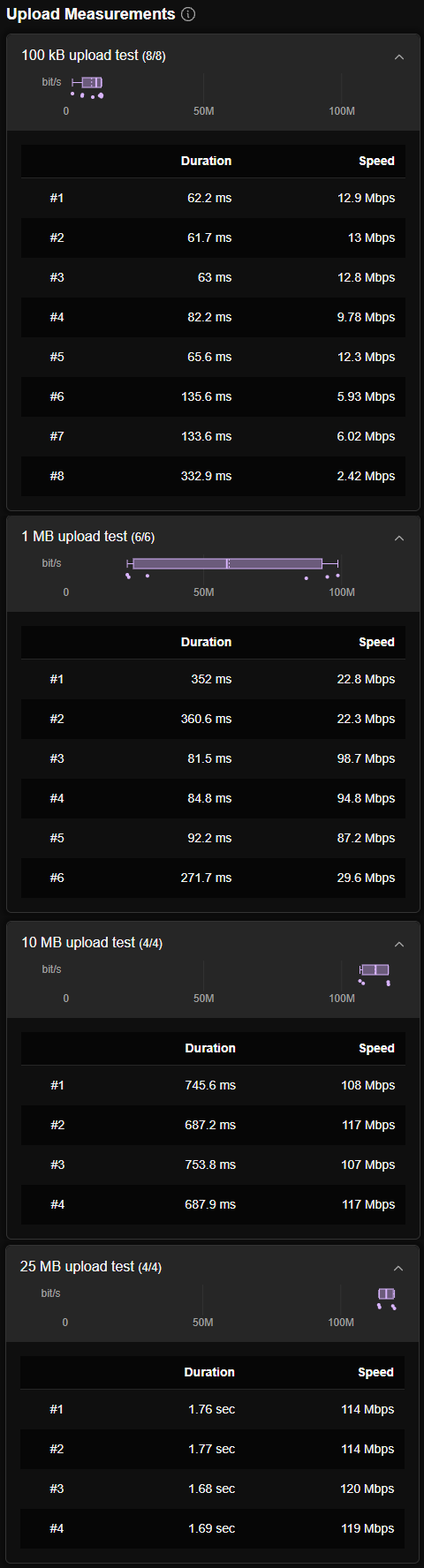
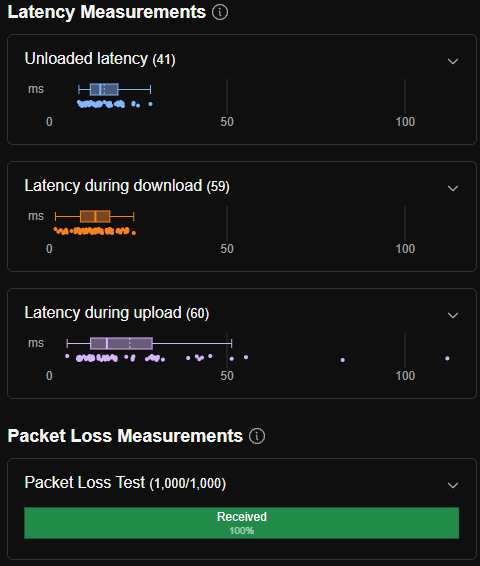
On my computer's end, I never saw any disconnection notifications of my network adapter. Internet speed tests were highly varied. Sometimes the tests came back with 545 mbps, and sometimes it would go as high as 1197 mbps. When playing Old School RuneScape, I would consistently get disconnected from the game server every minute or so but it would automatically reconnect in a few seconds. This would rinse and repeat while playing. I've tried the other ethernet ports on the gateway and the same things happen.
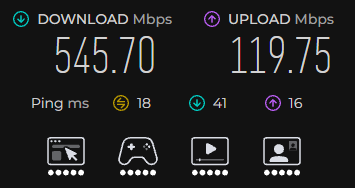
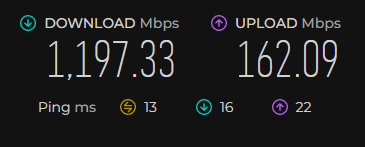
There are no problems what so ever when switching back to WiFi. The aforementioned problems still happened after both cold rebooting the gateway AND as well as after factory resetting the gateway. At first I thought it was because the coax cable connecting the XB8 gateway was connected to a coax splitter, and I never removed it from the last setup which needed a splitter to connect both the XB6 and the old TV cable box. So, I removed the splitter and even with the XB8 directly connected to the wall, the same problems happened.
I don't think the problem stems from my PC, and here's the thing that's making me rule it out. I was also having problems when I was first setting up the new cable TV Box that the Xfinity store provided to replace our old coaxial only box. The new box, the Xfinity Xi6, operates via internet to deliver the TV signal. When I first had it first set up, I connected it via a short Cat5e ethernet cable because I was thinking a hardwire connection would be way better, and it would take away some WiFi traffic. However, we noticed how laggy the X1 menu felt. Sometimes we would press the controls on the remote, and it would take a while for the action to happen. Sometimes we would get a "one moment please" message pop up on screen before disappearing and allowing us to use the remote again. Changing channels was fine for a few seconds and then randomly it would take a while to change the channel. Video would occasionally black out and audio would sometimes pause. Changing to other ethernet ports on the gateway did not fix the problem nor using a different ethernet cable.
I then reset the cable box and changed it to a WiFi connection. ALL problems were eliminated. Everything felt smooth and navigating the X1 menus was fast. No video and audio problems. I thought nothing of it and left it at that. I really don't know what's going on here, and I hope someone can help. For the meantime now, I am back to using WiFi.
Another thing I noticed was that I was constantly getting this pop up message whenever I was accessing the gateway admin tools. Maybe like every 3 minutes or so it would say "access denied" and log me out.
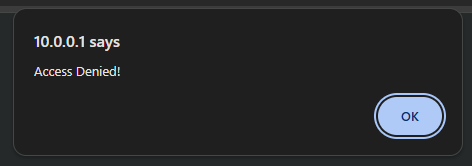
I will attach some additional images here as well to better help. If there is anything else needed on my end, please do let me know. Thanks!
Diagnostics from the gateway admin tools:
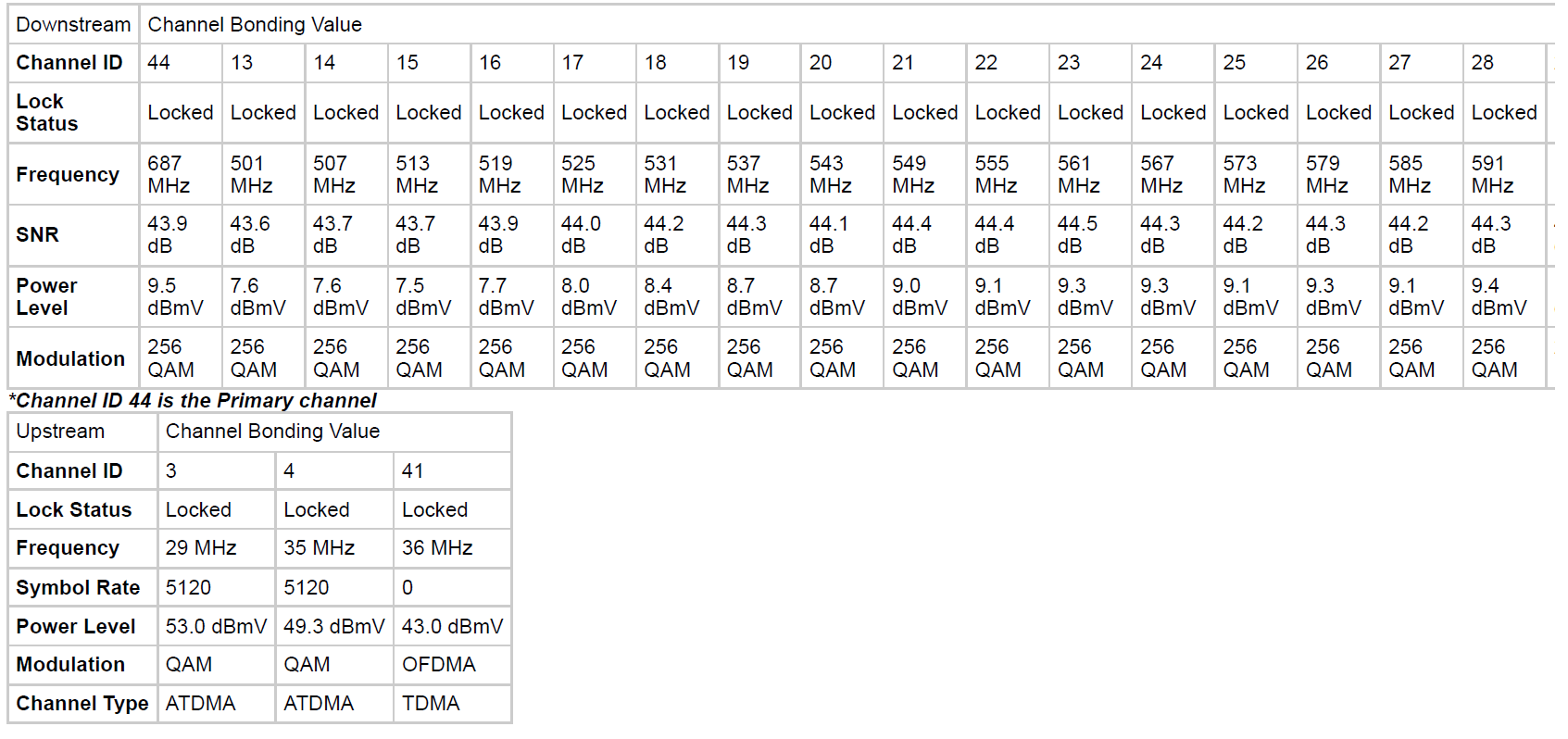

Cloudflare internet speed and latency tests:


No Responses!